Learn how to Update Haryana Family ID online. Complete guide to update PPP details, add family members, change address, bank details, mobile number, and track update status. Life doesn’t stay the same for long. A baby is born, a son or daughter gets married, someone moves to a new house, or a family member finishes a degree and starts a new job. All these small and big changes mean one thing for Haryana residents — your Family ID needs an update too.
If you’re a resident of Haryana, you already know how important the Parivar Pehchan Patra (PPP), commonly called the Family ID, has become. It’s linked to almost every government scheme in the state, from ration cards to scholarships to pensions. So if your family details are outdated, you could end up missing out on benefits you’re actually entitled to.
This guide walks you through the entire Haryana Family ID update process in plain, simple language — no confusing jargon, just clear steps you can follow right away.
Your Family ID acts like a digital record of your household. Government departments use this data to decide who qualifies for what. So if there’s a mismatch — say, a newborn isn’t added, or an old address is still showing — your family could be excluded from benefits without even knowing why.
Keeping this document current isn’t just a formality. It directly affects your access to welfare schemes, subsidies, and other government services. That’s exactly why the Haryana government has built an online system that lets you correct or update your details whenever something changes.
Updating your details doesn’t require a visit to a government office in most cases. Here’s how the process generally works:
Step 1: Log In to the Official Portal Head over to the official PPP Haryana website at https://ppp-office.haryana.gov.in/. Log in using your Family ID number and verify yourself through an OTP sent to your registered mobile number.
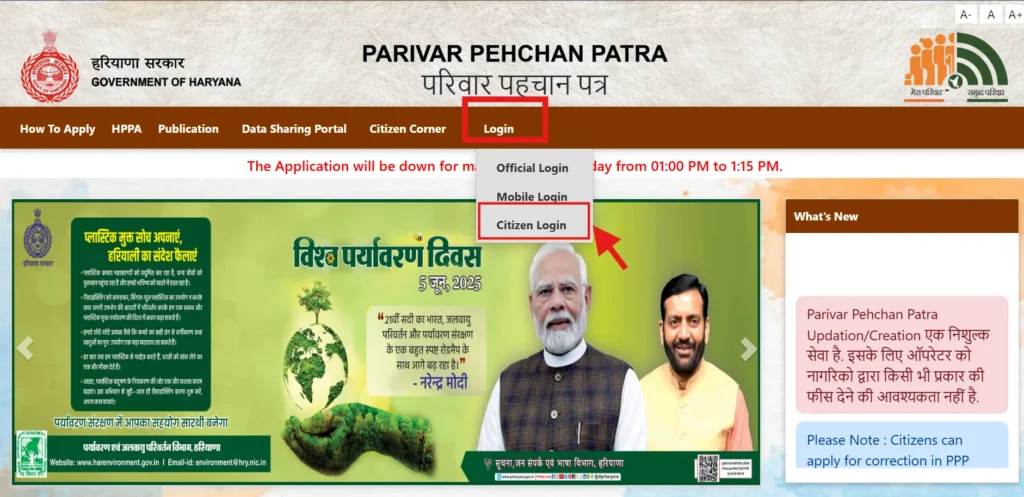
Step 2: Go to the Update Section Once you’re inside your dashboard, look for “Update Family Details” or the “Correction Module” under the Family Details tab. This is where all the update options live.
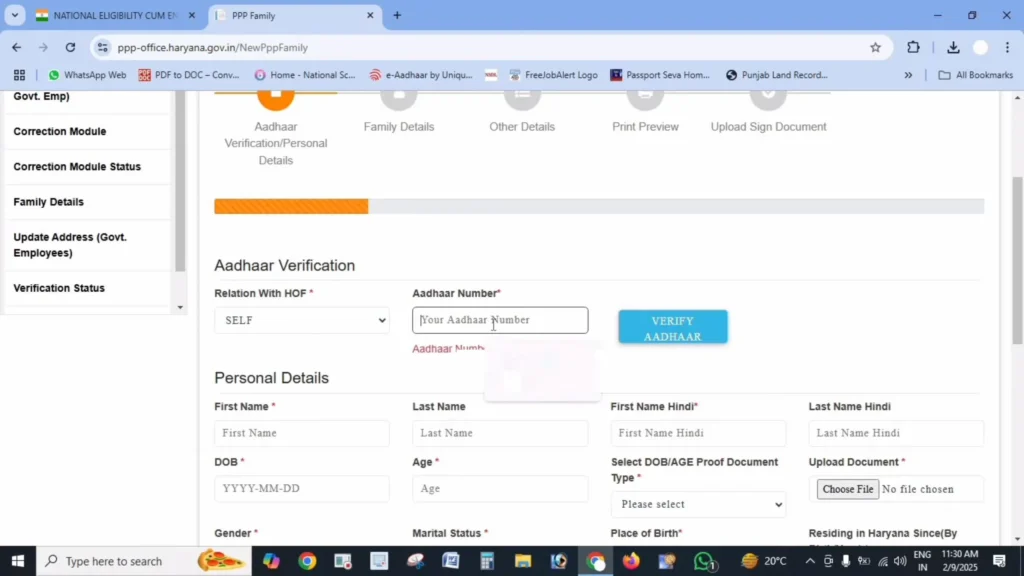
Step 3: Choose the Type of Update Depending on what changed in your family, select the relevant category — this could be anything from adding a member to changing your address.
Step 4: Fill in the New Details Enter the updated information carefully and attach any documents the system asks for.
Step 5: Submit and Verify Go through everything one more time before hitting submit. You may need to confirm the request with an OTP as well.
Step 6: Track Your Request After submission, you’ll get a reference number. Hold on to this — it’s how you’ll check the progress of your update later.
The PPP system is designed to handle a wide range of changes. Here’s a breakdown of the most common ones.
1. Adding a New Family Member
Whenever someone joins the family — through birth, marriage, or otherwise — you can add them directly through the portal.
What you need to do:
- Select the “Add Member” option
- Enter their Aadhaar number, if you have it
- Provide basic details like name, date of birth, gender, and how they’re related to the family head
- Upload proof such as a birth certificate, marriage certificate, or Aadhaar card
2. Removing a Family Member
Sometimes a member needs to be taken off the record — due to death, separation, or other circumstances.
What you need to do:
- Select “Remove Member”
- Pick the person to be removed
- Mention the reason
- Attach supporting proof, like a death certificate or divorce decree
3. Updating Personal Details
This covers changes such as education level, occupation, or marital status.
What you need to do:
- Choose “Update Personal Details”
- Select the family member whose record needs editing
- Pick the specific field you want to change
- Upload proof — educational certificates, an employment letter, or a marriage certificate, depending on the update
4. Updating Your Address
Moved houses or shifted to a new city or district? This is where you fix that.
What you need to do:
- Select “Update Address”
- Enter the complete new address, including house number, street, block, and district
- Update your property ownership status if it’s changed
- Attach an address proof document such as an electricity bill, water bill, or rent agreement
5. Updating Your Mobile Number
If your registered number is lost, deactivated, or simply outdated, you can replace it.
What you need to do:
- Select “Update Mobile Number”
- Verify yourself using your current number
- Enter the new number
- Confirm the new number through OTP
Just make sure both your old and new numbers are accessible during this process.
6. Updating Bank Details
Since many benefits are transferred directly to bank accounts, keeping this section accurate is especially important.
What you need to do:
- Select “Update Bank Details”
- Choose the relevant family member
- Enter the new account number, IFSC code, and bank name
- Upload a canceled cheque, passbook copy, or bank statement as proof
A little extra care at the time of submission can save you weeks of back-and-forth later. Keep these points in mind:
- Check document quality: All uploads should be clear PDFs under 200 KB.
- Verify before submitting: Small mismatches in spelling or numbers are a common reason for rejection.
- Track your status regularly: Don’t just submit and forget — log in periodically to check progress.
- Be patient: Update time is not fixed and can be different for every family, so keep checking your status on the official portal.
- Save your reference number: You’ll need it if you want to follow up on your request.
Once your update is approved, it’s a good idea to download a fresh copy of your Family ID so you have the latest version on hand.
Even with a fairly simple system, a few issues come up often. Here’s how to handle them:
- Update request rejected? Check the rejection reason shown on the portal. It’s usually related to a document issue or a data mismatch. Fix it and resubmit.
- Can’t upload documents? Make sure your file is a PDF and stays under 200 KB. Try compressing it or scanning at a lower resolution if it’s too large.
- Not receiving the OTP? First, check your mobile network. If the issue continues, visit your nearest Saral Kendra for help.
- Can’t find the update option at all? Confirm you’re logged in properly and browsing the correct section. Sometimes clearing your browser cache or switching browsers solves the problem.
Not every change needs manual action. In certain cases, the system updates itself:
- Births registered in Haryana can automatically get linked to your Family ID record.
- Deaths that are officially registered may also update the record on their own.
- Marriage registrations done through official channels can be reflected automatically too.
Even so, it’s worth double-checking that these automatic updates actually went through correctly. If they didn’t, you can always make the correction manually.
| Purpose | Link |
|---|---|
| Update Portal | https://ppp-office.haryana.gov.in/ |
| Check Update Status | https://meraparivar.haryana.gov.in/ |
| Saral Portal | https://saralharyana.gov.in/ |
Update time is not fixed and can be different for every family, so keep checking your status on the official portal. The exact time may vary depending on the type of update and the verification required.
Yes. You can select multiple family members during one session. However, each update request may be verified and processed separately.
No. Updating your Haryana Family ID is completely free of cost. Do not pay anyone claiming to charge for official updates.
Yes. After submitting your request, use the reference number provided to check the application status through the official portal.
If you are missing any required documents, visit your nearest Saral Kendra. The staff can guide you about alternative documents or the next steps.
You should update your Family ID whenever there is a major change in your family, such as a birth, death, marriage, address change, or a new educational qualification.
Your Haryana Family ID isn’t just another government document sitting in a folder — it’s actively connected to the benefits your family receives. Whenever life brings a change, big or small, taking a few minutes to complete your Haryana Family ID update can save you from unnecessary hassle down the line.
The process itself is straightforward: log in, pick the right update category, upload your documents, and track your request until it’s approved. Do this regularly, and you’ll never have to worry about missing out on a scheme because your records were out of date.