Haryana Family ID Registration. If you are a resident of Haryana, obtaining a Family ID, also known as the Parivar Pehchan Patra (PPP), is an important step for accessing various government services and welfare schemes. The Haryana government uses this unique family identification number to simplify the delivery of benefits, improve transparency, and maintain accurate family records.
This guide explains everything you need to know about Haryana Family ID Registration, including eligibility, required documents, the online registration process, how to update your details, and how to check your application status.
Whether you are registering for the first time or updating an existing Family ID, this step-by-step guide will help you complete the process smoothly. You can also get enrolment help at your nearest CSC, SARAL Kendra or through a PPP Operator.
Family ID Registration, known locally as Parivar Pehchan Patra (PPP), is a state initiative that assigns every household in Haryana a unique family identification number. The idea behind it is simple: instead of families submitting the same paperwork again and again for different schemes, one Family ID links all their information together in a single digital record.
Once your Family ID Registration is complete and verified, you will be assigned an 8-digit ID number. A temporary Family ID is issued to families who live outside Haryana but want to take benefits of Haryana government schemes. Families permanently living in Haryana get an 8-digit Family ID. The best part is that Family ID Registration doesn’t cost you anything — the entire process is free of charge.
Before you sit down to complete your Family ID Registration, it helps to have your paperwork ready. Here’s what you should gather in advance:
- Aadhaar cards for every member of the family
- An active mobile number belonging to the head of the household
- Address proof, such as a recent electricity bill
- Age proof for all family members (birth certificate, matriculation certificate, etc.)
- Voter ID cards for adult members, if you have them
- Bank account details, useful if you plan to receive direct benefit transfers
- Income or caste certificates, where applicable
- PAN card, if available
Having these on hand before you begin will make the Family ID Registration process go a lot faster.
A little preparation goes a long way with Family ID Registration. Keep these tips in mind:
- Scan every document as a PDF, and make sure each file stays under 200 KB
- Double-check that your mobile number is active and can receive an OTP
- Gather details for all family members ahead of time — birth dates, education background, and so on
- Block out enough time so you can finish the form without rushing or getting interrupted
Here’s the full walkthrough of the online Family ID Registration process, broken into simple steps.
Step 1: Visit the Official Portal
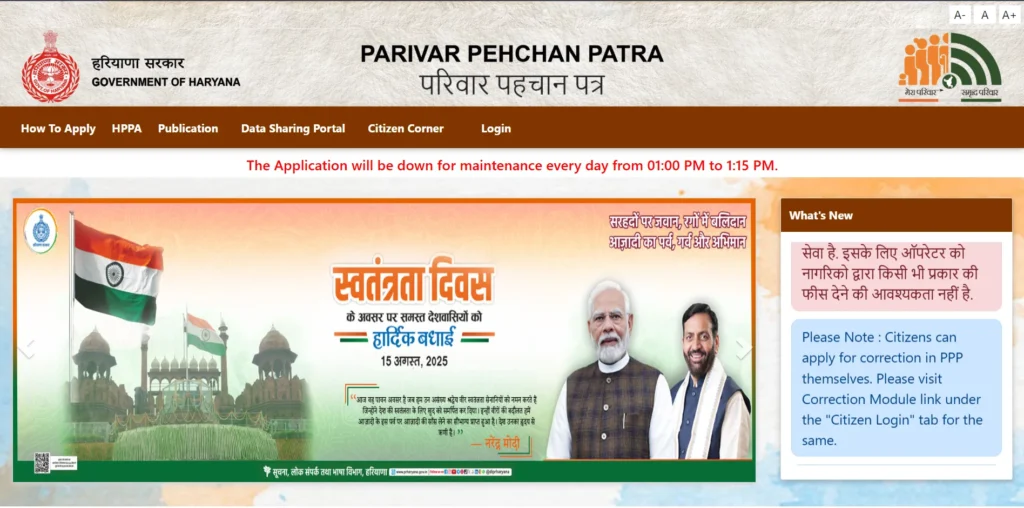
Head over to the official Family ID Registration website at https://ppp-office.haryana.gov.in/. This is the only official platform where you should submit your application.
Step 2: Start the Registration Process
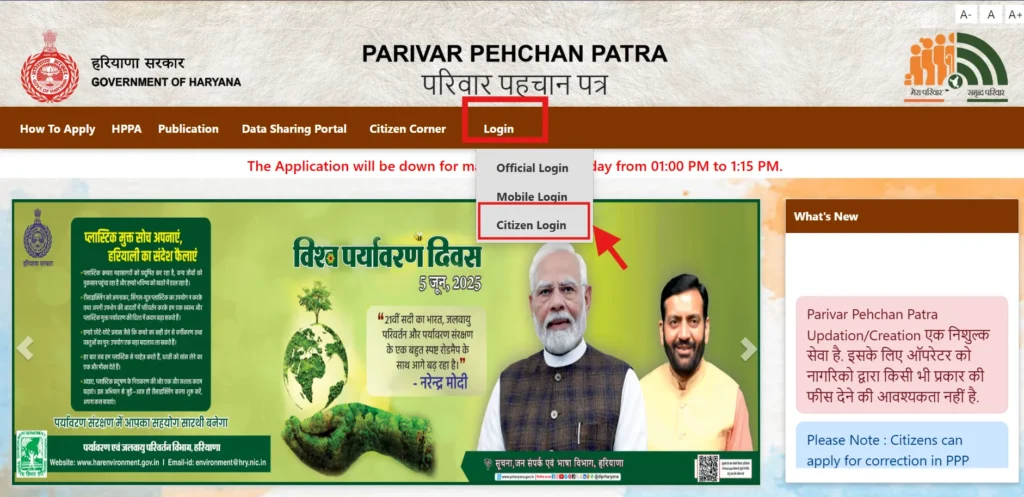
On the homepage, click “Citizen Login.” When the system asks whether you already have a Family ID, choose “No” — this tells the portal you’re starting a fresh Parivar Pehchan Number (PPN) application.
Step 3: Enter the Aadhaar Number
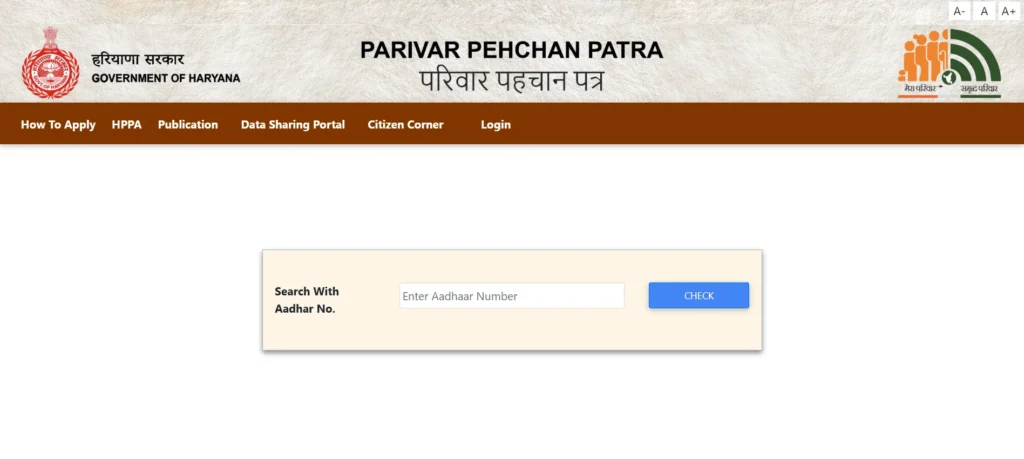
Type in the Aadhaar number belonging to the head of the family. The system will send a one-time password (OTP) to the mobile number that’s linked to that Aadhaar card.
Step 4: Verify the OTP
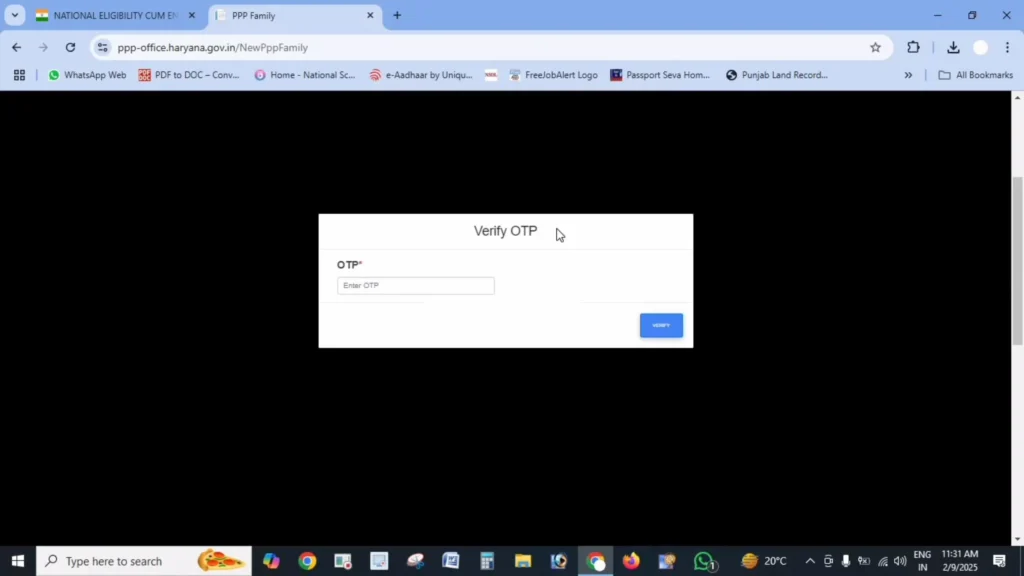
Enter the OTP you receive to confirm your identity and move forward with your Family ID Registration.
Step 5: Fill In Your Personal Details
Once your OTP is verified, some fields — like your name and date of birth — will be pulled automatically from your Aadhaar record. You’ll still need to fill in a fair amount of additional information yourself, including:
- Name in Hindi (first and last)
- Proof document used for date of birth (school certificate, birth certificate, voter ID, or matriculation certificate)
- Issue date and number of that document
- Gender and marital status
- Place of birth, including whether it’s inside or outside Haryana
- How long you’ve lived in Haryana
- Mobile number (this field is mandatory)
- Email address (optional)
- Caste category, along with supporting proof if you fall under SC/ST/OBC
- Disability status, if applicable, with percentage and proof
- Voter ID details, if you have one
- PAN card number, if available
- Annual income and its source
Step 6: Upload Your Documents
Now it’s time to upload clear PDF copies of your supporting documents, each kept under 200 KB:
- Aadhaar cards for all family members
- Proof of age
- Voter IDs for adults
- Address proof
- Income or caste certificates, if relevant
- Bank passbook or statement, for direct benefit transfers
- PAN card, if you have one
A quick tip: if any document is over the 200 KB limit, use a free PDF compression tool to shrink it before uploading — and make sure everything is legible.
Step 7: Add Details of Every Family Member
Family ID Registration requires you to enter details for the whole household, not just the applicant. This includes:
- Father’s details — whether living or deceased, Aadhaar number, name in English and Hindi, and date of death if applicable
- Mother’s details — Aadhaar number and name in both English and Hindi
- Spouse’s details, if applicable
- Current address, including house number, street, district, block, property ID, and ownership status
- Details for every other family member, such as children — their Aadhaar number, date of birth, name, and relationship to the head of the family
Step 8: Review Everything and Submit
Before hitting submit, go through every field carefully. Mistakes at this stage can lead to your Family ID Registration being rejected or cause delays in receiving benefits later. Once you’re confident everything is accurate, click “Submit.”
Step 9: Save Your Temporary ID Number
After your enrolment is submitted, keep the details you received safe so you can check your application status later.
Sources Link : Official Haryana Government portals
Submitting the form isn’t the end of the process. Here’s what to expect afterward:
- Track your application — Use your temporary ID or registered mobile number to keep an eye on your application’s progress.
- Verification — Local authorities will verify the information you’ve submitted. Verification time is not fixed and can be different for every family, so keep checking your status on the official portal.
- Get your permanent ID — Once verification is complete, your temporary number is replaced with a permanent 8-digit Family ID.
- Download your ID — After approval, you can download your official Family ID directly from the portal.
It’s worth noting that your Family ID is linked to birth, death, and marriage records, so certain updates happen automatically. Even so, it’s a good idea to manually update major life events yourself rather than relying entirely on automatic syncing.
Running into trouble during Family ID Registration is fairly common. Here are the most frequent issues and how to resolve them:
OTP not arriving? Check that your Aadhaar has the correct, active mobile number linked to it. If it doesn’t, update your mobile number with Aadhaar first, or get help at a Saral Kendra.
Documents won’t upload? Make sure every file is a PDF, stays under 200 KB, and is clearly readable. Compress files that are too large.
Application freezing or getting stuck? Try clearing your browser’s cache, switching to a different browser, or applying during off-peak hours when the server isn’t as busy.
Aadhaar verification failing? Recheck the Aadhaar number you entered for typos. If the issue continues, your Aadhaar details may need updating — visit your nearest Aadhaar center.
Trouble adding family members? Make sure you have complete details for each person. If one member’s information is causing an error, finish the registration with the rest of the family first and add that person later through the update process.
Not everyone is comfortable applying online, and that’s okay — Family ID Registration can also be completed in person at your nearest Saral Kendra. Here’s how it works:
- Bring all original documents along with photocopies
- Staff at the center will help you fill out the application
- They’ll scan and upload your documents on your behalf
- You’ll walk away with a temporary ID number to track your application
Completing your Family ID Registration comes with several practical advantages:
- One-time effort — Register once and use the same ID to access multiple government schemes
- Simplified access to benefits — No more repeatedly submitting the same paperwork for different programs
- Automatic updates — Certain life events update your record automatically through linked databases
- A digital family record — Your household’s information is stored securely and can be accessed when needed
- Centralized information — Everything about your family sits in one place, making future applications easier
| Purpose | Link |
| Registration Portal | https://ppp-office.haryana.gov.in/ |
| Track Application | https://meraparivar.haryana.gov.in/ |
| Find Nearest Saral Kendra | https://saralharyana.gov.in/ |
Typically, the head of the household, often the oldest male member or the primary earner, submits the Family ID Registration application on behalf of the entire family.
Yes, Aadhaar is recommended for every family member. However, very young children who do not yet have an Aadhaar card can be added later through the Family ID update process.
Yes. NRIs who own property or maintain a permanent residence in Haryana can apply by providing valid proof of their connection to the state.
Some documents, such as Aadhaar, are mandatory, while others depend on your situation. If you are missing any required documents, visit your nearest Saral Kendra to learn about available alternatives.
After submitting your application, you will receive a temporary Family ID. Once your details are verified successfully, your permanent Family ID will be issued.
No. Once your Family ID Registration application has been submitted, it cannot be edited. If you find any mistakes, you must wait until your Family ID is issued and then update the information through the official update process.
If your application is rejected, you will be informed of the reason. After correcting the issue, you can submit a new application with accurate information.
There is no fixed deadline for Family ID Registration. However, registering early is recommended so you can access government schemes and benefits without delays.
Family ID Registration might feel like a lot of paperwork at first glance, but once it’s done, it genuinely simplifies how you interact with government schemes in Haryana. Keep your documents ready, follow the steps carefully, and you should have your Family ID up and running without much hassle.
Sources Link : Official Haryana Government portals