PPP Family ID Add New Member
PPP Family ID Add New Member. If you want to add a new member to your Haryana PPP Family ID, you can update your family details through the Parivar Pehchan Patra system. The PPP database is designed to maintain verified information about families in Haryana and is used for various government services and welfare schemes.
A new member may need to be added after a birth, marriage, or another eligible change in family structure. Depending on the status of your Family ID and the type of update, you may be able to use the self-update facility or get assistance from a CSC, Saral Kendra, or authorized PPP operator.
What Is PPP Family ID?
The Parivar Pehchan Patra (PPP) is Haryana’s family identification system. A permanent family generally receives an 8-digit Family ID, which connects family information with various government services and schemes.
Keeping the information in your PPP record updated is important because government departments may use verified family information when providing services or determining eligibility.
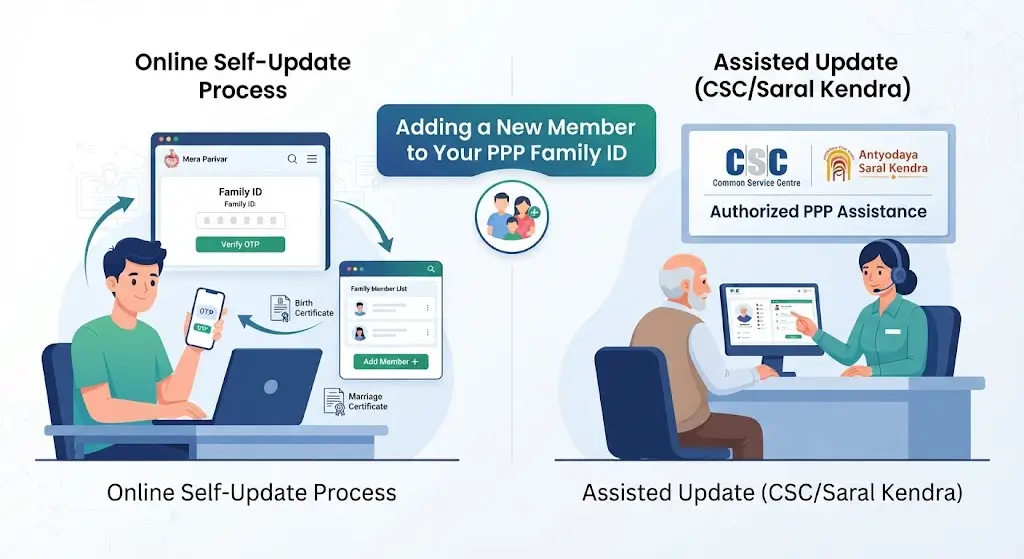
How to Add New Member in PPP Family ID
The general self-update process starts from the Update Family Details facility on the Mera Parivar portal.
Step 1: Open the PPP Portal
Visit the official Haryana Parivar Pehchan Patra portal and look for the option related to updating family details.
The official self-update procedure uses the Update Family Details option on the Mera Parivar portal.
Step 2: Enter Your Family ID
Enter your existing PPP Family ID when requested.
The self-update procedure has historically supported the 8-digit Family ID, with older PPP records also using an earlier 12-digit format.
Step 3: Verify With OTP
After entering the Family ID, an OTP is sent to the mobile number registered with the Head of Family.
Enter the OTP to authenticate your request and access the family record.
Step 4: Open Your Family Details
After successful OTP verification, the family members associated with the Family ID are displayed.
Review the existing information carefully before making any changes.
Step 5: Select the Add Member Option
If your family record is eligible for the relevant update, look for the Add Member option.
Select it and enter the requested information about the new family member.
The PPP self-update procedure includes rules for adding members, and availability of the option can depend on the verification status and applicable family-structure rules.
Step 6: Enter the New Member’s Details
Provide the information requested by the portal. This may include details such as:
- Name
- Date of birth
- Gender
- Relationship with the family
- Aadhaar-related information
- Other information requested by the PPP system
Enter the information exactly as it appears in the relevant official documents.
Step 7: Submit the Update Request
Review all information before submitting the request.
If the portal requires additional verification or supporting information, complete that process as instructed.
After submission, the information may be subject to verification before it becomes fully reflected in the PPP record.
Who Can Be Added to a PPP Family ID?
The exact eligibility depends on the family situation and PPP rules. Common situations that may require a family record to be updated include:
Newborn Child
After a child is born, the family may need to update its PPP record to include the child.
Make sure the child’s identity and supporting records are available before attempting the update.
Husband or Wife After Marriage
Marriage can change the family structure recorded in PPP. Depending on the circumstances, the spouse may need to be linked with the appropriate Family ID.
Haryana also introduced a provision in 2026 concerning certain cases where newly married men were added to their in-laws’ Family ID and later needed to be linked back to their original family record.
Other Eligible Family Changes
Other changes in family structure may also require an update. Because PPP records are subject to verification, the correct procedure can vary according to the circumstances.
Documents Required to Add a New Member
Keep the relevant documents available before starting the process. Depending on the type of member being added, you may need information or documents such as:
- Aadhaar details of the new member
- Birth certificate for a newborn
- Marriage-related documents where applicable
- Existing Family ID
- Registered mobile number
- Other supporting documents requested during verification
The exact requirements can vary, so users should follow the documents and information requested by the official PPP system rather than relying only on a third-party checklist.
How to Add a Newborn Baby to PPP Family ID
If you are adding a newborn, first make sure the child’s birth-related records are properly available.
Then:
- Open the PPP update facility.
- Enter your Family ID.
- Complete OTP verification using the registered mobile number.
- Open the family details.
- Check whether the Add Member option is available.
- Enter the child’s requested information.
- Submit the update.
- Complete any verification required by the system.
Do not enter incorrect personal information simply to complete the submission. The PPP system uses verification mechanisms, and incorrect information can create problems later.
What If the Add Member Option Is Not Showing?
This is one of the most common problems users may encounter.
The Add Member option is not necessarily available in every situation. PPP’s self-update process has rules based on the verification status and structure of the family record. For example, official procedure material explains that member addition can depend on whether the family structure has already been validated and the required signed family form is available in the database.
If you cannot see the option:
- Check that you are using the correct Family ID.
- Make sure the Head of Family’s registered mobile number is active.
- Complete OTP authentication correctly.
- Check whether your family record has been verified.
- Try the update again later if the portal is experiencing a technical issue.
- If self-update is unavailable, contact a CSC, Saral Kendra, or PPP operator for assisted service.
The PPP system provides both self-update and assisted modes for updating family information.
Can I Add a Member Through CSC or Saral Kendra?
Yes, assisted channels can be used when you cannot complete the update yourself.
The PPP system has provided assisted updating through Common Service Centres (CSCs), Antyodaya Saral Kendras and PPP operators.
Take your Family ID and the relevant documents with you. The operator can check your record and guide you through the applicable update process.
How to Check the Updated Family Details
After the request has been processed, log in to your PPP Family ID and review the family member list.
Check the following details carefully:
- New member’s name
- Date of birth
- Gender
- Relationship
- Aadhaar-related information
- Other displayed personal details
If something is incorrect, use the appropriate correction or update facility rather than creating another family record.
Important Points Before Adding a New Member
Keep these points in mind:
- Use only your genuine Family ID.
- Enter information exactly according to official records.
- Keep the Head of Family’s registered mobile number available for OTP verification.
- Do not create another Family ID just because you cannot immediately add a member.
- Check the status of your existing family record before making changes.
- If the self-update option does not allow the required change, use an authorized assisted channel.
- Always verify the final family details after the update.
PPP information can be used by Haryana government departments for services and welfare programs, so keeping the record accurate is important.
PPP Family ID Add New Member: FAQs
Can I add a new member to my PPP Family ID online?
You may be able to add a member through the self-update facility if your family record and the requested change meet the applicable PPP rules.
How do I add a newborn baby to Family ID?
Use the PPP family-details update facility, complete OTP verification, and check whether the Add Member option is available. Enter the child’s information and complete any verification required by the system.
Can I add my wife or husband to PPP Family ID?
Marriage-related family changes can require PPP records to be updated. The appropriate process depends on how the existing family records are structured.
Why is the Add Member option not available?
The option can depend on the verification status and structure of the PPP family record. If self-update does not allow the change, you can seek assistance through a CSC, Saral Kendra, or PPP operator.
Do I need the Family ID to add a member?
For updating an existing family record through self-update, the Family ID is used to access the family details and authenticate the request.
Is PPP Family ID the same as Aadhaar?
No. Aadhaar identifies an individual, while PPP Family ID identifies the family record in Haryana’s Parivar Pehchan Patra system.
Final Words
Adding a new member to a PPP Family ID is part of keeping your Haryana family record accurate and up to date. Start with the Update Family Details facility, authenticate using the registered mobile number, and check whether your family record allows the required addition.
If the online Add Member option is unavailable, do not submit incorrect information or create a duplicate family record. Instead, use an authorized CSC, Saral Kendra, or PPP operator for assistance.
Related Article: Haryana Family ID status
Disclaimer: This website is not the official Haryana PPP portal. It provides general information for educational and guidance purposes. PPP rules, portal options, and verification procedures may change. Always verify the latest requirements through the official Haryana government portal before submitting your information.